
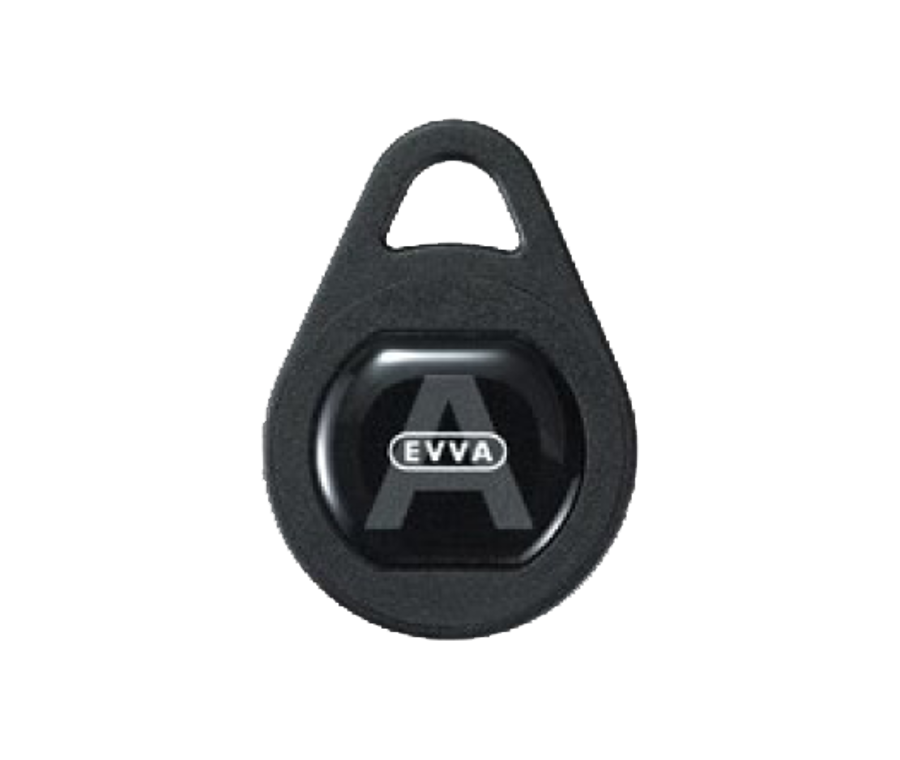
EVVA AirKey Proximity Tag - 5 Fobs
Delivery2-3 days
Product CodeALL25630
Overview
The EVVA AirKey Proximity Tag - 5 Fobs pack provides five contactless proximity fobs for use with the EVVA AirKey electronic access control system. Each fob acts as a user credential, presented to an AirKey reader to gain access once it has been authorised on the system.
Fobs are supplied blank and must be authorised in the AirKey software before use, in the same way as a card or mobile phone credential, with each fob's authorisation using one keycredit.
Key Features
- Pack of 5 proximity fobs for the EVVA AirKey access control system
- Contactless credential, presented to an AirKey reader to gain access
- Compact keyring tag, a convenient alternative to a card or mobile phone credential
- Authorised and managed through the free AirKey software
- Access rights can be set and changed per fob, per door or group of doors
- Lost or stolen fobs can be deactivated in the software without affecting other users
Technical Specifications
| Compatible System | EVVA AirKey |
|---|---|
| Type | Proximity Tag (Fob) |
| Pack Quantity | 5 Fobs |
| Software | AirKey software (free) |
| Manufacturer | EVVA |
Suitable For
These fobs are suitable for small and medium-sized businesses using the EVVA AirKey electronic access control system, wherever staff, tenants or visitors need a compact keyring credential rather than a card or mobile phone.
What's Included
- 5 x EVVA AirKey Proximity Tags (Fobs)
Fobs are supplied unauthorised and must be set up in the AirKey software before they will operate a reader.
Installation & Maintenance
Each fob must be authorised in the AirKey software before it will work, which uses one keycredit per fob. Once authorised, access rights can be set for one door or several at the same time, and can be changed later using a further keycredit.
If a fob is lost or stolen, it can be deactivated in the software so it no longer operates any reader, without needing to change the access rights of other users.
Frequently Asked Questions
Do these fobs work straight out of the pack?
No, each fob must first be authorised in the AirKey software before it will operate a reader.
Does authorising a fob use a keycredit?
Yes, authorising each fob uses one keycredit, in the same way as authorising a card or mobile phone.
What happens if a fob is lost or stolen?
It can be deactivated in the AirKey software so it no longer works, without affecting the access rights of other users.
Can one fob be set up for multiple doors?
Yes, a fob's access rights can cover a single door or several doors, and only uses one keycredit provided this is all done at the same time.
What's the difference between a fob and a card?
Both are contactless credentials that work in the same way once authorised; a fob is a compact keyring tag, while a card is credit card-sized, so the choice comes down to which is more convenient for the user to carry.
What software is used to manage these fobs?
Fobs are managed through the free AirKey software, used to authorise fobs and set or change their access rights.
| mpn | L25630 |
|---|---|
| Delivery | 2-3 days |
| SKU | ALL25630 |